
As cyber threats continue to evolve, traditional software-based security is often not enough to protect sensitive information. Modern computers require hardware-level security mechanisms that can safeguard passwords, encryption keys, and system integrity even if the operating system is compromised.
One of the most important hardware security technologies used today is the Trusted Platform Module (TPM). TPM provides a secure foundation for encryption, authentication, and device security. It is widely used in modern operating systems, including Windows 11, to enhance protection against malware, ransomware, and unauthorized access.
1. What is a Trusted Platform Module (TPM)?
Definition:
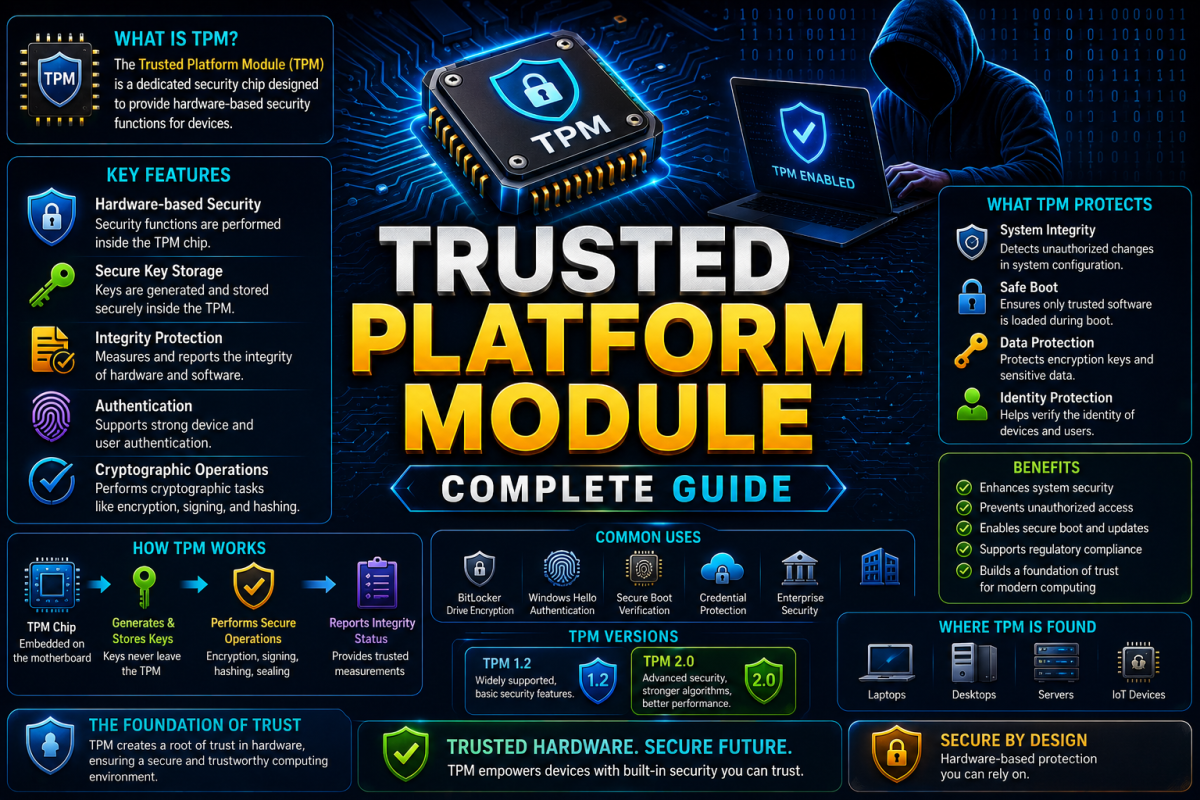
A Trusted Platform Module (TPM) is a specialized hardware security chip or embedded processor designed to perform cryptographic operations and securely store sensitive information such as encryption keys, passwords, and digital certificates.
Explanation:
TPM acts as a secure vault inside a computer. It creates, stores, and protects cryptographic keys in a way that prevents unauthorized software or attackers from accessing them. Since TPM operates at the hardware level, it provides stronger protection than software-only security solutions.
Example:
When BitLocker encrypts a hard drive, the encryption key can be securely stored inside the TPM chip, preventing attackers from easily accessing the protected data.
2. Why is TPM Important?
2.1 Hardware-Based Security
Definition:
TPM provides security directly through hardware rather than relying only on software.
Explanation:
Software can sometimes be modified or attacked by malware. TPM creates a hardware barrier that protects critical security functions from unauthorized access.
Example:
A virus may compromise the operating system, but TPM-protected keys remain isolated and secure.
2.2 Protection Against Cyber Attacks
Definition:
TPM helps defend systems against advanced cyber threats.
Explanation:
It protects encryption keys, credentials, and authentication data from theft. TPM also reduces the risk of ransomware and malware attacks targeting sensitive information.
Example:
Modern Windows security features rely on TPM to strengthen device protection.
2.3 Secure Authentication
Definition:
TPM helps verify device identity and user credentials.
Explanation:
Authentication keys stored inside TPM cannot easily be copied or stolen, making login systems more secure.
Example:
Windows Hello uses TPM to securely manage biometric authentication.
3. How TPM Works
Step-by-Step Process:
Step 1: Key Generation
The TPM generates cryptographic keys inside the chip.
Step 2: Secure Storage
The generated keys are securely stored and cannot easily be exported.
Step 3: System Verification
During startup, TPM measures important system components such as firmware and boot files.
Step 4: Integrity Check
TPM compares security measurements to detect unauthorized modifications.
Step 5: Secure Access
If everything is verified successfully, protected keys and resources become available.
This process creates a trusted computing environment and helps ensure that the system starts securely.
4. Main Features of TPM
4.1 Secure Key Storage
Definition:
Stores cryptographic keys in a protected hardware environment.
Explanation:
Keys stored within TPM are isolated from the operating system, making them much harder to steal.
Example:
Encryption keys used by BitLocker remain protected inside TPM.
4.2 Platform Integrity Verification
Definition:
Verifies that the system has not been tampered with during startup.
Explanation:
TPM records measurements of the boot process and checks whether system components remain trusted.
Example:
Detecting unauthorized bootloader modifications.
4.3 Device Authentication
Definition:
Allows systems to prove their identity securely.
Explanation:
TPM can use unique device credentials to authenticate systems in enterprise environments.
Example:
Corporate networks verifying trusted devices before granting access.
4.4 Secure Boot Support
Definition:
Works with Secure Boot technologies to ensure only trusted software loads during startup.
Explanation:
This prevents malicious programs from executing before the operating system starts.
Example:
Protection against bootkits and firmware-level malware.
5. TPM Versions
TPM 1.2
Definition:
An older TPM specification used in many legacy systems.
Explanation:
Provides fundamental security features but supports fewer modern cryptographic algorithms.
TPM 2.0
Definition:
The latest and most widely adopted TPM standard.
Explanation:
Offers stronger cryptographic capabilities, better flexibility, and enhanced security features. TPM 2.0 is required for Windows 11 compatibility.
6. Applications of TPM
BitLocker Drive Encryption
TPM securely stores encryption keys used to protect hard drives, making stolen devices more difficult to access.
Windows Hello
TPM supports biometric authentication such as fingerprint and facial recognition.
Secure Boot
TPM helps ensure that only trusted software loads during startup.
Digital Certificates
TPM securely stores certificates used for authentication and encrypted communication.
Enterprise Security
Organizations use TPM for device management, identity verification, and compliance requirements.
7. Advantages of TPM
Hardware-level security protection
Secure storage of cryptographic keys
Protection against malware and ransomware
Enhanced authentication mechanisms
Supports encryption technologies
Improves system integrity verification
Reduces risk of credential theft
Essential for modern operating system security
8. Limitations of TPM
Requires compatible hardware
Incorrect configuration can reduce effectiveness
Physical attacks may still be possible in certain situations
TPM alone cannot replace antivirus or other security solutions
Advanced security still depends on proper system management
9. TPM and Windows 11
One of the main reasons TPM gained widespread attention is Microsoft's requirement for TPM 2.0 in Windows 11. Microsoft considers TPM a critical security component that helps protect user identities, encryption keys, and system integrity. This requirement strengthens the overall security posture of modern devices.
Conclusion
Trusted Platform Module (TPM) is a powerful hardware-based security technology that forms the foundation of many modern cybersecurity systems. By securely storing cryptographic keys, verifying system integrity, and supporting secure authentication, TPM helps protect computers against a wide range of cyber threats.
As organizations increasingly adopt hardware-based security approaches, understanding TPM has become essential for students, IT professionals, and cybersecurity enthusiasts.
Want to master Cryptography, Cybersecurity, Ethical Hacking, and System Security?
👉 Join BNIT Computer Education
👉 Learn cybersecurity from beginner to advanced level
👉 Practical training with real-world security technologies
👉 Industry-focused learning and career guidance
Build the skills needed for the future of cybersecurity.
BNIT Computer Education – Empowering the Next Generation of Cybersecurity Professionals